
Computer Hardware: The Essential Foundation of Modern Computing
Computer hardware is the physical foundation that makes modern computing possible. Every desktop computer, laptop, server, smartphone, and digital device depends on hardware components to process information, store data, display content, and communicate with other devices. As technology continues to advance, computer hardware is becoming faster, more powerful, energy-efficient, and capable of supporting increasingly complex applications.
What Is Computer Hardware?
Computer hardware refers to the physical components of a computer system that can be seen and touched. These components work together with software to perform different computing tasks.
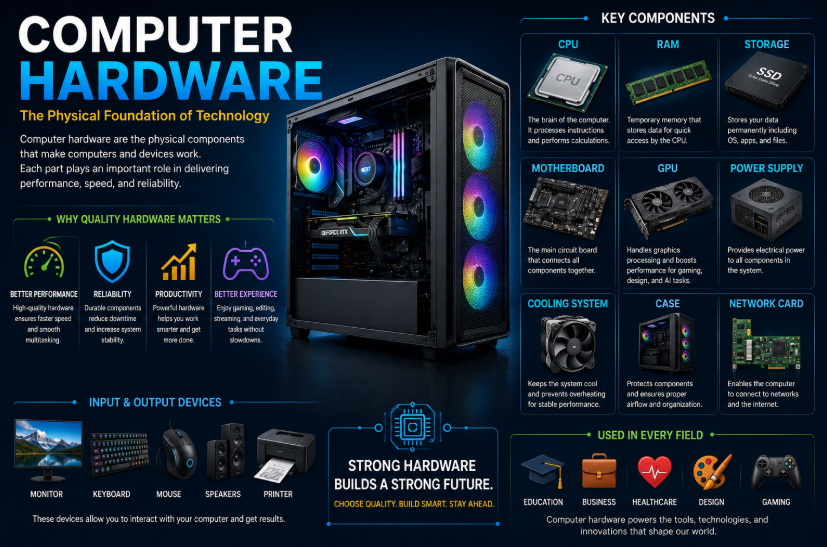
Common hardware components include the processor, memory, storage devices, motherboard, graphics card, power supply, cooling system, monitor, keyboard, and mouse.
Main Components of Computer Hardware
1. Central Processing Unit (CPU)
The CPU is often called the brain of the computer. It processes instructions and performs calculations required by software and applications. A modern CPU can contain multiple processing cores, allowing it to handle several tasks efficiently.
2. Random Access Memory (RAM)
RAM provides temporary storage for data and programs that the computer is actively using. More RAM can help a computer handle multiple applications and demanding workloads more efficiently.
3. Storage Devices
Storage hardware is used to permanently save operating systems, applications, documents, photos, videos, and other files. Solid-state drives (SSDs) are popular because they generally provide faster performance than traditional hard disk drives (HDDs).
4. Graphics Processing Unit (GPU)
A GPU processes visual information and is essential for gaming, video editing, 3D rendering, design, and many artificial intelligence workloads. Modern GPUs can perform large numbers of calculations simultaneously.
5. Motherboard
The motherboard connects major computer components and allows them to communicate with one another. It provides connections for the CPU, RAM, storage, graphics hardware, and other devices.
6. Power Supply
The power supply unit provides electrical power to the computer’s internal components. A reliable power supply is important for stable and safe system operation.
7. Input and Output Devices
Keyboards, mice, webcams, microphones, monitors, printers, and speakers are examples of input and output hardware. These devices allow users to interact with computers and receive information from them.
Why Computer Hardware Matters
High-quality hardware can improve computer performance, reliability, productivity, and user experience. Businesses depend on powerful computers and servers for applications such as data analysis, software development, cloud services, cybersecurity, and artificial intelligence.
For consumers, choosing the right hardware can make a significant difference in gaming, office work, content creation, education, and everyday computing.
How to Choose the Right Hardware
When selecting computer hardware, users should consider performance requirements, compatibility, budget, power consumption, upgrade options, and long-term reliability. A computer designed for basic office tasks may require very different hardware from a system used for gaming, video production, engineering, or AI development.
The Future of Computer Hardware
The future of computer hardware is being shaped by artificial intelligence, advanced processors, high-performance GPUs, faster storage, energy-efficient chips, and specialized computing systems. New hardware designs are helping computers process larger amounts of information while consuming less energy.
Computer hardware and software work together to create the digital experiences people rely on every day. As hardware technology continues to evolve, it will remain a critical foundation for innovation, productivity, and the future of computing.